
FocusBar: When AI Builds a Screen It Can’t See

November 24, 2026
My role at Focus keeps me close to the technological revolution we’re witnessing, though mostly from the business side. While I’m in daily contact with our team on work like agentic PCB design, in the end my job boils down to talking to people, taking planes and drinking coffee, so I sometimes miss the hands-on action.
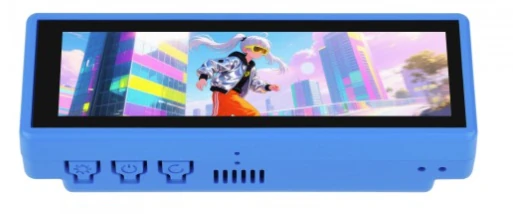
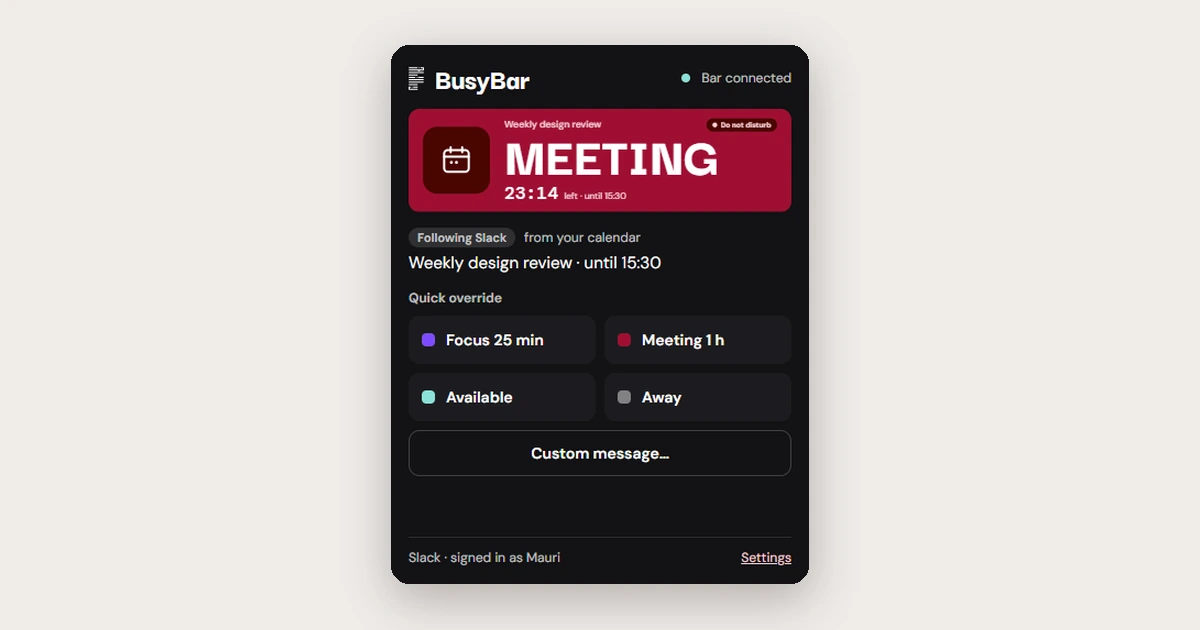
During one of these flights, a device I had seen a long time ago came to mind. The BusyBar is a cool gadget that sits on top of your monitor and tracks your calls, Slack status, and other things.
I wondered how quickly something like that could be implemented nowadays, leveraging AI and off-the-shelf hardware. Then I recalled that I had a little gadget lying around my desk and thought, “Wouldn’t building our own version of the BusyBar using that device be a fun project to try?”
Forty-eight hours later, I had a working device on my desk. But the most interesting part of the project was what the AI couldn’t do on its own.
The challenge: AI can’t see the screen
The main problem I encountered was that this little device has an LCD screen, so the AI can’t “see” what’s going on, preventing a true automated closed-loop development cycle.
The tool: giving AI eyes
To let the AI "look" at the display quickly and without wasting tokens, I needed a Python script that takes a photo with the computer's webcam, finds the display and crops it. Back at university, writing something similar by hand took me a couple of nights of struggling with edge detection. This time, I had a working prototype in about three minutes. From a plane.
The script is about 700 lines of Python (OpenCV and NumPy) and works in five steps:
- Capture. Grab a fresh webcam frame. Exposure can be locked so the bright screen doesn’t clip.
- Find the screen. On a downscaled copy, pick the four-sided shape that is bright inside and surrounded by a dark bezel.
- Refine the corners. On the full-size frame, snap each side to the sharpest nearby edge and fit a line along it, for sub-pixel-accurate corners.
- Recover the true size. Work out the screen’s real aspect ratio from the perspective (Claude cites “Zhang and He, Whiteboard scanning and image enhancement, 2007”, but of course I didn’t read the paper), so the camera can be at an angle.
- Straighten and save. Warp the screen into a front-facing crop and report how much of it is overexposed.
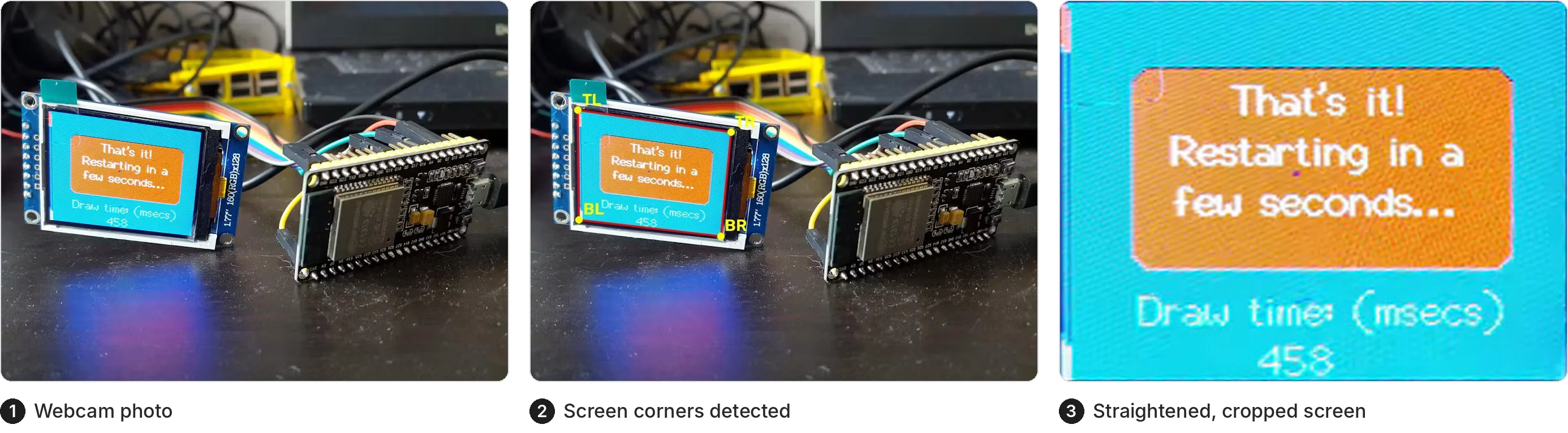
Quite cool, huh? Now we can start using this tool to develop our bar.
The plan: success defined before any code
The most important part of leveraging AI tools for the development of a system like this is spending time on the project plan. After describing what I had in mind, Claude and I discussed the technical approach.
Initially, Claude wanted to implement it over Wi-Fi, but I thought Bluetooth was a better fit for what we needed. After agreeing on the overall architecture (a firmware project, a multiplatform app, and a Slack plugin), we started discussing the tech stack for each component.
This is the stack we ended up with:
The firmware side was familiar ground for me, after years of writing firmware on FreeRTOS. Most of the app and testing stack, though, is outside what I personally work with day to day. That’s part of what made the experiment interesting: with a clear plan and good tests, I could move confidently using an otherwise overwhelming combination of technologies.
For this kind of project, it is very important to specify and agree on a set of use cases that will be tested and validated, as that’s what defines what success looks like.
These are the use cases we agreed on, and the tests check each of them:
- Slack drives the bar: a meeting on my calendar, a huddle, a focus status or Do not disturb shows within 15 seconds.
- Locking the computer shows Away; sleeping, signing out or quitting the app says goodbye to the bar cleanly.
- Overrides from the tray app or a double tap on the bar, which also set my Slack status and Do not disturb, and put them back afterwards.
- Connecting the bar by USB, or pairing it over Bluetooth with a 6-digit code shown on its screen.
- If the app goes away, the bar says so (Offline), and it dims after the computer goes to sleep.
- Every screen matches the approved design, pixel for pixel.
The execution: AI builds, the hardware tests it
The execution process was straightforward. Claude implemented pretty much everything autonomously, asking me to interact when a test or a validation required some physical interaction with the device. I was surprised at how some interactions between the physical device and the app are hard for Claude to understand, but clearly describing the observed behavior and the expected result works pretty well.
Those physical interactions and the tests uncovered real problems along the way. Some examples:
- A single line of deeply nested JSON could crash the bar, even over Bluetooth before pairing.
- A burst of messages over USB lost about half of them, because the USB driver drops data silently when its buffer is full.
- After forgetting a pairing, the bar stayed invisible to Bluetooth for a minute, because Windows kept the old link open. I found that one by pairing again for real.
- The screen controller ignores the command that selects the starting row, so the bar always sends the whole frame.
The tool for the tool: AI improves its own eyes
This is the part of the execution process that surprised me the most, and that deserves a special treatment. Claude understood how to use my Python tool for looking at the display right away, and used it to verify the display orientation, brightness and color bit mapping.
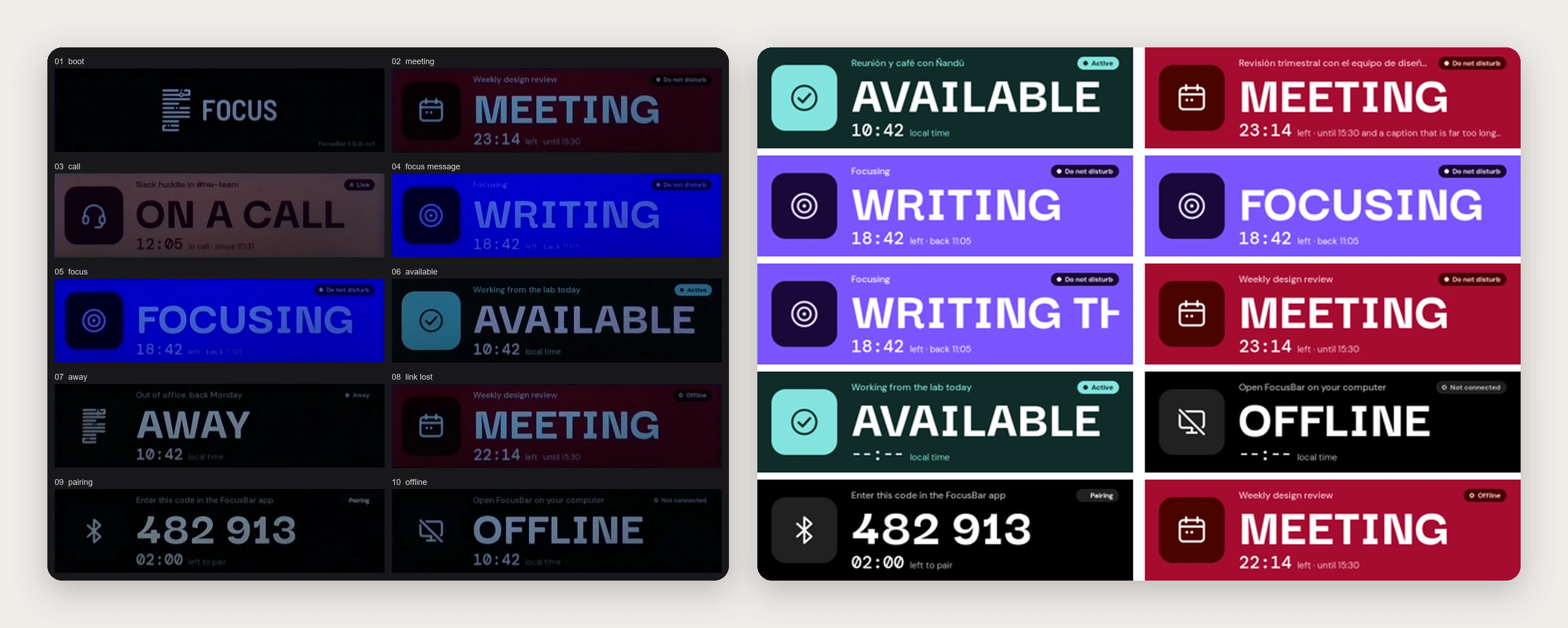
During screen validation, Claude struggled to find the screen's edges on dark backgrounds. That makes sense: the device's black bezel blends in with the display when the pixels are off. What surprised me was the fix. Claude added a firmware feature that draws a white frame around the interface, giving the cropping tool a clear reference.
In other words, Claude learned to use the tool I gave it, then built a tool around my tool to do its job better. Combining tools built on years of human experience with tools the AI designs around them will be key to developing AI-based embedded systems, and probably any complex, multi-component system.
The results
Claude logged the time and tokens of every task. The table puts each stage next to an estimate of what the same work would take one experienced engineer doing it by hand, with the same depth of testing. The estimate is mine, not a measurement.
Claude’s time is the time it was actually working: 13.5 hours in all, spread over 48 hours from the first task to the last, most of it waiting for my checks, or overnight. I don’t think I spent more than two or three hours of my own time on this.
The learnings
What does the modern embedded development lifecycle look like?
AI needs to "see" what's happening on your device. With that in mind:
- Build the tools that give your AI eyes.
- Lean on traditional software. Claude can read a display from a raw screenshot, but my cropping tool saved time and cost, because a cropped image takes less effort to understand.
- Displays are only part of it. LED brightness, power consumption and temperature matter too. Integrate every sensor your harness needs; it can later double as a HITL test fixture.
- Define the system's features and success criteria.
- Choose the tech stack deliberately, favoring components your team can review and own.
- Plan the project in stages, each with a measurable deliverable the AI must deliver before moving on.
- Define the tests that validate each stage.
Only then should development start. If a feature changes along the way, update every item on this list.
Does this mean product development went from months to a couple of days?
No. This wasn't a product: the requirements were loose and there was no customer. For a real product, defining and validating requirements takes far longer. The code also wasn't reviewed for maintainability, so shipping it as-is would be very risky.
What can we expect regarding quality?
I expect software quality to rise dramatically. Turning a Figma layout into HTML and then into LVGL widgets used to be a tedious, error-prone manual pipeline. Automation removes most of that.
Still, automated passes miss nuances an experienced developer spots right away. The firmware has no power-saving modes, like slower sensor polling or dimming the LCD when idle. And JSON isn't lightweight; a binary protocol would save wireless bandwidth.
The cause: my spec never asked for low-power states. But power efficiency and transport security should be defaults in any device. A standard "embedded skill" that enforces these baselines on every project would close that gap.
What is the role of the engineering team in this new context?
This is the most important part of the article. It might seem that AI makes engineers unnecessary. I couldn't disagree more.
They draw the boundaries
Engineers make an "invisible" contribution. They define what the interface looks like and how the board communicates with the PC. They decide which signals the AI needs to observe, and which sensors and measurements can be trusted. They decide what "correct" means for the system, including the edge cases and failure modes nobody wrote down. The AI works inside those boundaries. It does not draw them.
They understand the customer
Every project starts with ideas, not a finished spec, and that's how it should be. Customers are experts in their users and their market; turning that knowledge into precise requirements is something we do together. Often the most important constraint only surfaces through conversation: asking the right questions, exploring what's behind each request, and building trust over time. An AI only works from the requirements it's given. If those aren't right, it builds the wrong thing very quickly.
They give the AI reliable eyes
The same goes for the harness. Someone has to design the cropping tool, choose where to place the sensors, and judge whether a measurement reflects real behavior or an artifact of the setup. An AI with bad eyes will confidently report that a broken system works.
They hold the gates
The AI can propose a design, write code, and run tests, but a person decides whether a deliverable meets the bar before the project moves forward. That judgment depends on knowing the hardware, the tradeoffs in the stack, and what the customer actually needs.
They own the result
Code nobody can review or maintain is a liability, however fast it was written. The team is accountable for what ships, so they have to understand it.
AI changes how fast engineers work, not the need for them to understand the customer, decide what to build, and verify it's good enough. At Focus, that's how we approach AI-assisted development: engineers set the requirements, tests and gates, and AI gets us there faster.
Let's compare notes
FocusBar was a side project, but the questions behind it are the ones we work through every day: how to give AI reliable eyes on real hardware, where it speeds things up, and where engineering judgment has to stay in charge. At Focus, our approach is clear: engineers define the requirements, the tests and the gates, and AI helps us get there faster.
If you're experimenting with AI-assisted development in embedded systems, whether you're building tools, testing workflows or figuring out how it fits your team, I'd love to hear what you're learning. Let's connect!
Stay focused on what’s next
Stories, ideas, and insights from the world of technology, product development, and innovation.




Contact
Let’s Talk!© Copyright 2026 Focus. All Rights Reserved.